 AutoCADder
Friday, April 13, 2012
AutoCAD 2013 - what's new
There seems to be a new record in the low number of new features introduced in AutoCAD 2013. Even my favourite command history chart from CAD Forum tells that AutoCAD 2013 has the lowest number of new commands and variables ever (if we take versions 2000i and 2002 as a combined release):
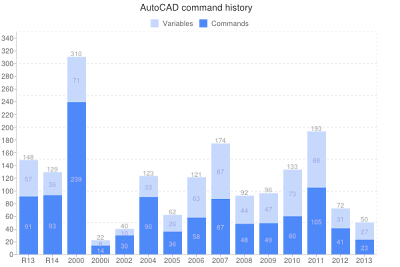
Most of the new functionality relates to the Autodesk Cloud "Autodesk 360". This cloud initiative lead in the CAD area by Autodesk is quite interesting and I consider it rather useful. E.g. the cloud render or simple cloud-based sharing of drawing files and AutoCAD custom settings is something that most users might need every day. But off-line users can write off half of the new features.
The new interactive and transparent command window can make AutoCADder's life easier but it is rather a cosmetic enhancement. The 3D documentation features probably won't be used by many users as they probably do 3D in other applications, also those by Autodesk (Inventor, Revit). But the openness of this function - can create 2D views from any 3D model/file - is a nice attitude. You can use AutoCAD as a documentation tool for 3D CAD models coming from Solidworks, CATIA, Pro/E, etc.
One of the underestimated functions in AutoCAD 2013 - the Apps Exchange online store. You can very easily choose and install any of the plug-in applications offered mostly for free there.

Most of the new functionality relates to the Autodesk Cloud "Autodesk 360". This cloud initiative lead in the CAD area by Autodesk is quite interesting and I consider it rather useful. E.g. the cloud render or simple cloud-based sharing of drawing files and AutoCAD custom settings is something that most users might need every day. But off-line users can write off half of the new features.
The new interactive and transparent command window can make AutoCADder's life easier but it is rather a cosmetic enhancement. The 3D documentation features probably won't be used by many users as they probably do 3D in other applications, also those by Autodesk (Inventor, Revit). But the openness of this function - can create 2D views from any 3D model/file - is a nice attitude. You can use AutoCAD as a documentation tool for 3D CAD models coming from Solidworks, CATIA, Pro/E, etc.
One of the underestimated functions in AutoCAD 2013 - the Apps Exchange online store. You can very easily choose and install any of the plug-in applications offered mostly for free there.
Labels: AutoCAD 2013, commands


Monday, April 04, 2011
AutoCAD 2012 - new features
When I look at the new features of the recently released AutoCAD 2012, I can see less new functionality than usual - compared to previous releases. There are interesting new functions for 3D - e.g. the import of the CAD formats of non-Autodesk CAD software, the 3D model views, the new 3D editing functions - but for 2D drafting there are not so many enhancements.
One notable 2D feature is the dynamic array - you can interactively make and modify radial and rectangular and path arrays. Another general new feature is the Content Explorer - finally you can quickly search contents (texts, blocks...) of DWG files, not only on your disk but also on other PCs in your network. But all other enhancements are really small ones.
I cannot forget the online functions of AutoCAD WS but for people working on local DWG files it brings no direct productivity enhancements. What I don't understand fully is the decision to bundle Inventor Fusion. Why is it a part of AutoCAD now? Doesn't AutoCAD have enough 3D editing functions of its own?
PS: I have now received a Twitter notification for a command history graph - it confirms the size of the AutoCAD 2011.5 (aka 2012) version having the least new commands since version 2002
One notable 2D feature is the dynamic array - you can interactively make and modify radial and rectangular and path arrays. Another general new feature is the Content Explorer - finally you can quickly search contents (texts, blocks...) of DWG files, not only on your disk but also on other PCs in your network. But all other enhancements are really small ones.
I cannot forget the online functions of AutoCAD WS but for people working on local DWG files it brings no direct productivity enhancements. What I don't understand fully is the decision to bundle Inventor Fusion. Why is it a part of AutoCAD now? Doesn't AutoCAD have enough 3D editing functions of its own?
PS: I have now received a Twitter notification for a command history graph - it confirms the size of the AutoCAD 2011.5 (aka 2012) version having the least new commands since version 2002
Labels: AutoCAD 2012, commands, features
Wednesday, May 05, 2010
AutoCAD 2011 - a major upgrade in terms of commands

In a follow-up to one of my older posts to AutoCAD 2009 I am updating the chart of the number of commands introduced in the individual versions of AutoCAD.
Again I have used the updated AutoCAD commands database on the CADforum.cz and compared the number of new commands introduced in each version. In this chart you can see that the AutoCAD 2011 is one of the major releases. In fact the biggest since Release 2000.
Labels: AutoCAD 2011, commands
Monday, March 30, 2009
AutoCAD 2010 commands and variables
If you need a list of the new commands and variables introduced in AutoCAD 2010, there is a README file displayed at the end of the AutoCAD installation. Traditionally, this Readme doesn't list all of the new commands nor variables. And traditionally, a more complete list can be found on Hyperpics and CAD Forum (and variables).
This time the Readme doesn't list any obsoleted commands in version 2010, but still I have found one - the JOGSECTION command (now as SECTIONPLANEJOG).
In terms of the number of new commands (and especially variables, AutoCAD 2010 is one of the major releases (see also my older post for A2009) - with 55 new commands and 67 new variables (using the CAD Forum database numbers).
Here is the graph with the number of new commands in the latest AutoCAD releases:

This time the Readme doesn't list any obsoleted commands in version 2010, but still I have found one - the JOGSECTION command (now as SECTIONPLANEJOG).
In terms of the number of new commands (and especially variables, AutoCAD 2010 is one of the major releases (see also my older post for A2009) - with 55 new commands and 67 new variables (using the CAD Forum database numbers).
Here is the graph with the number of new commands in the latest AutoCAD releases:

Labels: AutoCAD 2010, commands
Tuesday, November 18, 2008
Missing commands in AutoCAD LT
It is hard to believe but AutoCAD LT has about 580 less commands and variables than the full version. Some of the missing commands are not important but many of them are - so make sure you know the limitations before you choose LT over AutoCAD Mechanical, Architectural, MEP or Map for simple price reasons.
See LT - missing commands
See LT - missing commands

Labels: AutoCAD LT, commands, variables
Wednesday, October 08, 2008
Unlock hidden functions in DWG TrueView
DWG TrueView is the official (and free) viewer for DWG files. It is known that TrueView is based on full AutoCAD (and also its size tells so). Unlike AutoCAD, DWG TrueView has no command line to enter commands and its set of menu commands is very limited - just the functions you need for viewing, measuring and plotting.
CAD Forum has published today a very interesting tip how you can unlock more AutoCAD commands and variables in DWG TrueView:
Hidden commands in DWG TrueView
CAD Forum has published today a very interesting tip how you can unlock more AutoCAD commands and variables in DWG TrueView:
Hidden commands in DWG TrueView
Labels: AutoCAD, commands, DWG, TrueView 2009, variables
Wednesday, April 16, 2008
AutoCAD "major" versions in terms of new commands

Is AutoCAD 2009 a "major" or "minor" version?
There are discussions whether AutoCAD 2000i, 2005 or 2009 are really full new versions or just smaller updates, whether the odd versions are better or worse than the even ones (a popular urban legend).
I have used the AutoCAD commands database on the CADforum web site to compare the number of new commands introduced in the individual AutoCAD versions. These numbers differ a lot - especially see the glitch in the chart of AutoCAD 2000 and 2000i (combined) new commands. But the sheer number of commands can hardly express the scope of changes done in the specific version of the software. E.g. a change in DWG file format or a new rendering engine is definitely a major change but it might not be expressed in adding any new commands.

The graph was generated online using the Google Chart API with this chart URL.
Labels: AutoCAD 2009, AutoCAD versions, commands
Wednesday, January 30, 2008
AutoCAD command map
Shaan Hurley's Between the Lines blog writes about the AutoCAD command and system variable map. It is interesting that the number of commands has not changed since AutoCAD R12 - of course many new commands were introduced but some old ones are now obsolete.
Read the post and discussion at:
For AutoCAD Geeks - Command and System Variables Map and Trivia
Read the post and discussion at:
For AutoCAD Geeks - Command and System Variables Map and Trivia
Thursday, November 01, 2007
AutoCAD commands at a glance

Searching for the german translation of an AutoCAD command I have found a very nice online resource of AutoCAD command names. This dictionary seems to contain all AutoCAD commands including Express Tools, in English, German, Italian, French and other languages.
The command list is hidden on the CAD Forum web, in its Tips section - AutoCAD commands. The command lookup resembles the CommandComplete tool in AutoCAD but this one works online - just type in some characters from the searched command and it dynamically lists all commands containing these characters while you type. The information about a particular command then includes its translation to other languages, eg. what is its German equivalent, the AutoCAD version it was first introduced and a short description. Alas this description seems to be missing on some commands.
I am used to work with the original English versions of AutoCAD commands but many of my collegues want to know command names for the German version of AutoCAD. So this page will definitely keep one of the top positions in my bookmark list.
Labels: AutoCAD, commands, language, translation
