 AutoCADder
Friday, April 13, 2012
AutoCAD 2013 - what's new
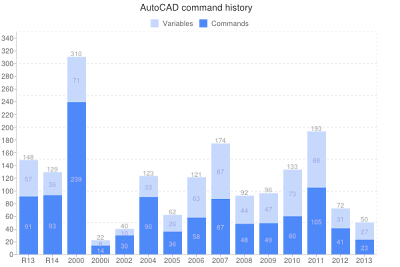
There seems to be a new record in the low number of new features introduced in AutoCAD 2013. Even my favourite command history chart from CAD Forum tells that AutoCAD 2013 has the lowest number of new commands and variables ever (if we take versions 2000i and 2002 as a combined release):
Most of the new functionality relates to the Autodesk Cloud "Autodesk 360". This cloud initiative lead in the CAD area by Autodesk is quite interesting and I consider it rather useful. E.g. the cloud render or simple cloud-based sharing of drawing files and AutoCAD custom settings is something that most users might need every day. But off-line users can write off half of the new features.
The new interactive and transparent command window can make AutoCADder's life easier but it is rather a cosmetic enhancement. The 3D documentation features probably won't be used by many users as they probably do 3D in other applications, also those by Autodesk (Inventor, Revit). But the openness of this function - can create 2D views from any 3D model/file - is a nice attitude. You can use AutoCAD as a documentation tool for 3D CAD models coming from Solidworks, CATIA, Pro/E, etc.
One of the underestimated functions in AutoCAD 2013 - the Apps Exchange online store. You can very easily choose and install any of the plug-in applications offered mostly for free there.

Most of the new functionality relates to the Autodesk Cloud "Autodesk 360". This cloud initiative lead in the CAD area by Autodesk is quite interesting and I consider it rather useful. E.g. the cloud render or simple cloud-based sharing of drawing files and AutoCAD custom settings is something that most users might need every day. But off-line users can write off half of the new features.
The new interactive and transparent command window can make AutoCADder's life easier but it is rather a cosmetic enhancement. The 3D documentation features probably won't be used by many users as they probably do 3D in other applications, also those by Autodesk (Inventor, Revit). But the openness of this function - can create 2D views from any 3D model/file - is a nice attitude. You can use AutoCAD as a documentation tool for 3D CAD models coming from Solidworks, CATIA, Pro/E, etc.
One of the underestimated functions in AutoCAD 2013 - the Apps Exchange online store. You can very easily choose and install any of the plug-in applications offered mostly for free there.
Labels: AutoCAD 2013, commands


Monday, April 04, 2011
AutoCAD 2012 - new features
When I look at the new features of the recently released AutoCAD 2012, I can see less new functionality than usual - compared to previous releases. There are interesting new functions for 3D - e.g. the import of the CAD formats of non-Autodesk CAD software, the 3D model views, the new 3D editing functions - but for 2D drafting there are not so many enhancements.
One notable 2D feature is the dynamic array - you can interactively make and modify radial and rectangular and path arrays. Another general new feature is the Content Explorer - finally you can quickly search contents (texts, blocks...) of DWG files, not only on your disk but also on other PCs in your network. But all other enhancements are really small ones.
I cannot forget the online functions of AutoCAD WS but for people working on local DWG files it brings no direct productivity enhancements. What I don't understand fully is the decision to bundle Inventor Fusion. Why is it a part of AutoCAD now? Doesn't AutoCAD have enough 3D editing functions of its own?
PS: I have now received a Twitter notification for a command history graph - it confirms the size of the AutoCAD 2011.5 (aka 2012) version having the least new commands since version 2002
One notable 2D feature is the dynamic array - you can interactively make and modify radial and rectangular and path arrays. Another general new feature is the Content Explorer - finally you can quickly search contents (texts, blocks...) of DWG files, not only on your disk but also on other PCs in your network. But all other enhancements are really small ones.
I cannot forget the online functions of AutoCAD WS but for people working on local DWG files it brings no direct productivity enhancements. What I don't understand fully is the decision to bundle Inventor Fusion. Why is it a part of AutoCAD now? Doesn't AutoCAD have enough 3D editing functions of its own?
PS: I have now received a Twitter notification for a command history graph - it confirms the size of the AutoCAD 2011.5 (aka 2012) version having the least new commands since version 2002
Labels: AutoCAD 2012, commands, features
Remote AutoCADder
My job is no longer directly related to AutoCAD so I will contribute to this blog less frequently. But I am still an AutoCAD fan so whenever I find something noteworthy about AutoCAD, I will try to post a blog message.
Labels: AutoCAD
Thursday, November 18, 2010
Borrow Autodesk hardware for your renderings
If you happen to render a series of large scenes, don't bother with snapping a new superfast hardware - Autodesk gives you its own hardware to perform this task.
Just login to the Autodesk Neon web service and upload your DWG file containing the 3D model (any size, any complexity), materials, lights and cameras. Then choose the camera (view), the output resolution, quality and the resulting file format. Now you have to wait a couple of minutes for your render to complete - rendering computation is performed on an Autodesk web cloud. Neon will send you a notification e-mail when your job or series of jobs is finished and ready for download.
This is perfect for last minute renderings when any computer in your office is too slow to complete the job before deadline...
Just login to the Autodesk Neon web service and upload your DWG file containing the 3D model (any size, any complexity), materials, lights and cameras. Then choose the camera (view), the output resolution, quality and the resulting file format. Now you have to wait a couple of minutes for your render to complete - rendering computation is performed on an Autodesk web cloud. Neon will send you a notification e-mail when your job or series of jobs is finished and ready for download.
This is perfect for last minute renderings when any computer in your office is too slow to complete the job before deadline...
Labels: Autodesk, DWG, Neon, render
Friday, September 24, 2010
DraftSight and other DWG incompatible clones
It is an interesting phenomenon this autumn. Even respectable software vendors jumps to be the first ones who release an AutoCAD clone for Mac, and better AutoCAD clone for Windows.
There is the Dassault's DraftSight, CAD Schroer's STHENO/LX, Graebert's ARES, ProgeCAD is said to be in the works, and maybe others.
The first strange thing in these feverish activities is the Mac platform. I don't know if the US market is so different but there are simply no Mac users in the technical/engineering industry in Europe. Someone should divulge that to these vendors.
The second thing is the lack of innovation. Are all these software vendors so short-sighted and non-creative that they are able only to copy (steal if you wish) an existing software - AutoCAD - and bring no own idea into their development?
And the third thing - the most important for us, users. When they happen to copy AutoCAD, they should do it right. I had a chance to try DraftSight which is said to read/write DWG files "almost like AutoCAD" and I can say that this is simply not true. DraftSight reads most of the DWG contents but not all! Some drawing objects are missing, some objects are interpreted differently that in the genuine AutoCAD. So you definitely cannot trust the DWG drawings you open or even modify in DraftSight. It does not support DWG, it does support only a clone of the DWG format (a subtle but important difference).
Maybe your business does not depend on the precision and fidelity of the technical drawings but our business does.
So if there happens to be some Mac users longing to process DWG files on their apple-boxes, they will need to use the official "AutoCAD for Mac" by Autodesk.
There is the Dassault's DraftSight, CAD Schroer's STHENO/LX, Graebert's ARES, ProgeCAD is said to be in the works, and maybe others.
The first strange thing in these feverish activities is the Mac platform. I don't know if the US market is so different but there are simply no Mac users in the technical/engineering industry in Europe. Someone should divulge that to these vendors.
The second thing is the lack of innovation. Are all these software vendors so short-sighted and non-creative that they are able only to copy (steal if you wish) an existing software - AutoCAD - and bring no own idea into their development?
And the third thing - the most important for us, users. When they happen to copy AutoCAD, they should do it right. I had a chance to try DraftSight which is said to read/write DWG files "almost like AutoCAD" and I can say that this is simply not true. DraftSight reads most of the DWG contents but not all! Some drawing objects are missing, some objects are interpreted differently that in the genuine AutoCAD. So you definitely cannot trust the DWG drawings you open or even modify in DraftSight. It does not support DWG, it does support only a clone of the DWG format (a subtle but important difference).
Maybe your business does not depend on the precision and fidelity of the technical drawings but our business does.
So if there happens to be some Mac users longing to process DWG files on their apple-boxes, they will need to use the official "AutoCAD for Mac" by Autodesk.
Labels: AutoCAD, clone, Draftsight, DWG, Mac
Monday, September 20, 2010
AutoCAD NOP commands
Do you know the "no operation" commands in AutoCAD? What AutoCAD commands do you know that do nothing?
The usual command used for NOP function is ID. But there are more, maybe better examples of these idle commands - e.g.:
The usual command used for NOP function is ID. But there are more, maybe better examples of these idle commands - e.g.:
- DELAY 0
- HYPERLINKSTOP
- *SCROLL
AutoCAD WS - a good thing in the Mac story
I can see a single positive thing on the whole AutoCAD for Mac story, which still makes little sense for me - AutoCAD WS. My reservations about putting effort in developing "another AutoCAD" instead of polishing the right one can be found in my previous posts.
But there is one offspring of the Autodesk-Apple story that is very interesting and very promising for Autodesk's future. AutoCAD WS (I understand that this will be the resulting name of the whole Butterfly Project) is a web cloud application running on Autodesk servers in the internet. Through the lightweight client of AutoCAD WS you can work on DWG drawings on virtually any device - a Flash-enabled internet browser on a PC, on a Smartphone, on an iPad or even on an iPhone and iPod. AutoCAD WS now supports only a limited subset of DWG objects (2D only) but still - this sounds promising.
But there is one offspring of the Autodesk-Apple story that is very interesting and very promising for Autodesk's future. AutoCAD WS (I understand that this will be the resulting name of the whole Butterfly Project) is a web cloud application running on Autodesk servers in the internet. Through the lightweight client of AutoCAD WS you can work on DWG drawings on virtually any device - a Flash-enabled internet browser on a PC, on a Smartphone, on an iPad or even on an iPhone and iPod. AutoCAD WS now supports only a limited subset of DWG objects (2D only) but still - this sounds promising.
Labels: AutoCAD WS
